Put the live Kp index or tonight's moon on your own site.
Two small cards, free to embed anywhere: the current planetary Kp index (the number aurora watchers check) and tonight's moon phase with a drawn disc. Each comes in two forms. The image badge is a plain SVG that the daily data run rewrites every morning; it works in any page, forum signature, or README that allows an image, and needs no script. The live badge is one script tag that renders the card in the visitor's browser with the current NOAA value or the phase computed for that minute. Both link back to Lumara. Nothing is tracked.
What do they look like?
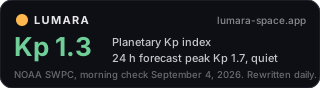
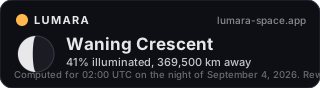
Above: the image badges as they stand this morning. Below: the live badges, rendered by the script on this page right now.
How do I add the image badge?
Paste one of these where you want the card. The image is 320 by 88 pixels, refreshed once a day at about 05:30 UTC, and carries the date of its last check in the card itself. Wrap it in the link so readers can reach the live page.
<a href="https://lumara-space.app/northern-lights-tonight.html">
  <img src="https://lumara-space.app/badge/kp.svg" width="320" height="88"
       alt="Planetary Kp index today, from Lumara">
</a>
<a href="https://lumara-space.app/moon-phase-tonight.html">
  <img src="https://lumara-space.app/badge/moon.svg" width="320" height="88"
       alt="Moon phase tonight, from Lumara">
</a>
For Markdown, a README, or a forum that takes image links:
[](https://lumara-space.app/northern-lights-tonight.html)
How do I add the live badge?
Paste one script tag where you want the card to appear. It inserts the card immediately after itself and links it to the matching Lumara page. Add data-theme="light" for a white card.
<script src="https://lumara-space.app/badge.js" data-badge="kp" async></script>
<script src="https://lumara-space.app/badge.js" data-badge="moon" data-theme="light" async></script>
The Kp card fetches NOAA's one-minute estimated Kp directly from the NOAA Space Weather Prediction Center in your visitor's browser and refreshes every 15 minutes while the page stays open. The moon card computes the phase, illumination, and distance locally with the same Meeus series the Lumara app uses; it makes no network request at all. If your site runs a Content-Security-Policy, allow https://lumara-space.app in script-src, and for the Kp card allow https://services.swpc.noaa.gov in connect-src. Styles are applied through the DOM, not inline attributes, so a strict style-src is fine.
What does it cost and what are the terms?
Nothing, and there is no sign-up. Use the badges on any site, commercial or not. Keep the link back to Lumara; that is the whole deal. The badge sends no cookies and reports nothing to Lumara about your visitors beyond the ordinary request for the image or script file, which our host logs the way any web server does. If a badge ever misbehaves on your site, write to the address on the support page.
Where do the numbers come from?
Kp is the planetary K-index published by NOAA's Space Weather Prediction Center: the image badge uses the latest 3-hour value at the morning check plus the 24-hour forecast peak, the live badge uses NOAA's one-minute estimate. The moon figures are computed, not fetched, from Jean Meeus's algorithms as implemented in Lumara; distance is good to about 150 km and illumination to about a percent. The about page lists every source the site uses, and the open data page has the same numbers as JSON if you would rather build your own.
Quick answers.
How often does the image badge update?
Once a day, at about 05:30 UTC, when the daily data run rewrites the site. The date of the check is printed on the card. For a value that is current to the minute, use the live badge.
Does the badge track my visitors?
No. No cookies, no identifiers, no analytics. The only request is for the image or script file itself.
Can I restyle it?
The live badge accepts data-theme="light" or "dark". Beyond that the card is fixed so that it stays legible and recognizable; if you need a different design, build from the JSON data instead.