A space screensaver that shows the actual Sun, right now
·Most space screensavers ship a video file, so the hundredth viewing is identical to the first. Lumara Screensaver Mode pulls the live feed from NASA's Solar Dynamics Observatory instead, so what fills the screen is the Sun as it looks this hour. It runs in a browser tab, costs nothing, and there is nothing to install.
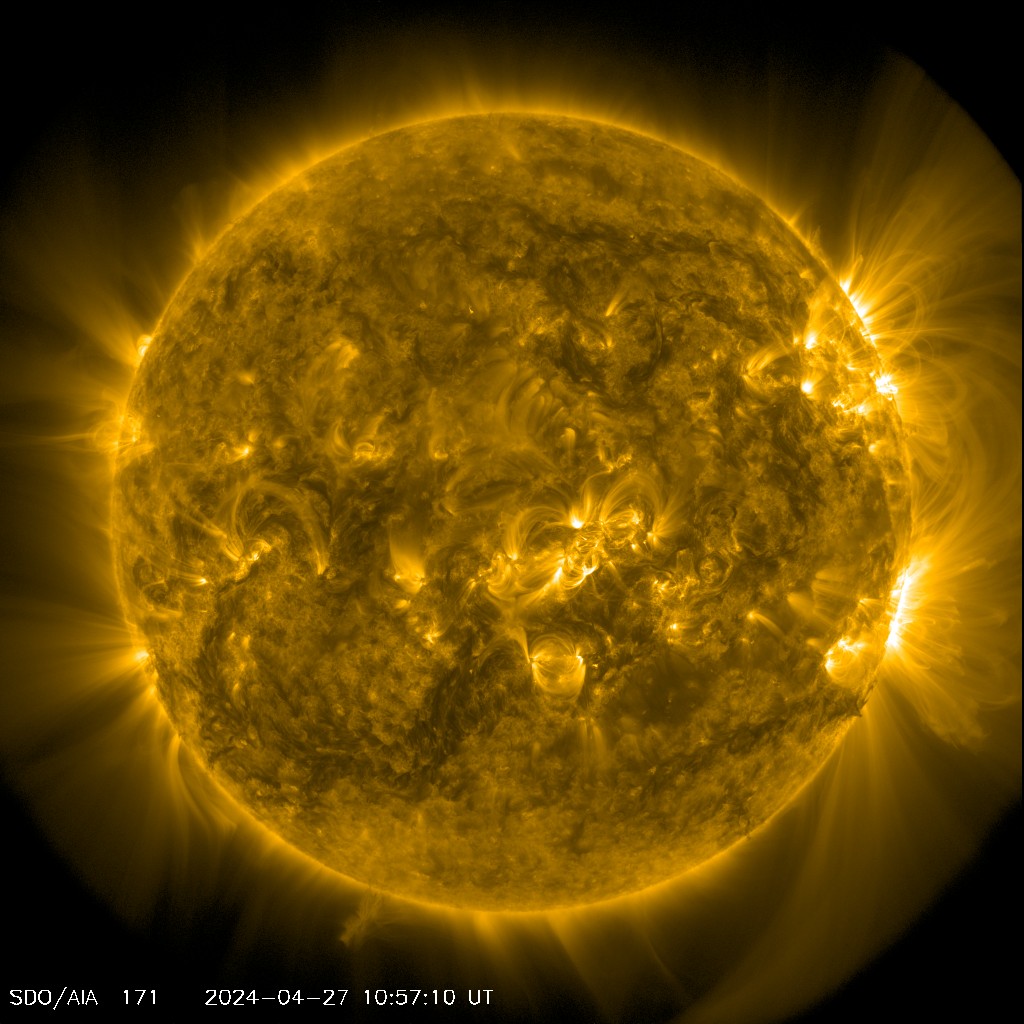
This is the live 171 angstrom frame, straight from NASA SDO. It is one of the twelve views the screensaver cycles.
What is on the screen?
The show is a loop of about two and a half minutes, and it alternates between still frames and motion so it never settles into wallpaper.
| Scene | What you see | Length |
|---|---|---|
| Still | One of 12 solar views, held steady | 12 seconds |
| Timelapse | A rolling 24 hour clip of the Sun turning | 15 seconds |
| Moon | Tonight's phase, drawn to the correct terminator | 38 seconds |
| Star rest | Deep starfield, nothing else | 24 seconds |
The twelve solar views are not filters. Each one is a different wavelength of light, and each shows a different layer of the Sun at a different temperature: the 304 angstrom chromosphere at roughly 50,000 K, the 171 angstrom quiet corona at 630,000 K, the 131 angstrom flare plasma at around 10 million K, the magnetogram where white and black mark opposing magnetic poles, and the SOHO coronagraph, which blocks out the disc so you can see the atmosphere streaming off the edge.
How do you run it on a TV or a spare monitor?
Open it in any browser on the screen you want it on, or cast the tab from a laptop, and press F for fullscreen. It is built to sit there: the animation and the video both pause when the tab is hidden, so a backgrounded tab is not quietly burning your battery.
The background is a flat matte black on purpose. An earlier version painted a soft colored glow behind the imagery, and on a dark screen in a dark room that glow read as a halo around the letterboxing rather than as part of the picture. It was removed. A screensaver you leave on should disappear into the wall.
What are the controls?
| Key | Does |
|---|---|
| Space | Pause and resume |
| F | Fullscreen on and off |
| Any other key | Exit back to the controls |
Move the mouse and a corner overlay wakes with the clock and the current space weather reading, then fades back out. Nothing else asks you for anything.
Why does live matter?
A looping video of the Sun is a picture of a day that already happened. The live feed refreshes about every 15 minutes, so a sunspot group that rotated into view this morning is on your screen this afternoon, and when the Sun throws a real flare you can watch the 131 angstrom view light up while it happens. Leave it running for a week and you will not see the same Sun twice.
The same applies to the moon scene. It is drawn for the current phase from the actual lunar cycle, not chosen from a set of stock images, so the sliver on screen tonight matches the sliver outside.
Common questions.
Is this space screensaver free?
Yes, and there is nothing to install or sign up for. It runs in a browser tab. Lumara has no ads, no premium tier, and no account of any kind.
Is it a video loop or is the imagery live?
It is live. The solar images come straight from NASA's Solar Dynamics Observatory and refresh roughly every 15 minutes, so the Sun you are looking at is the Sun as it is now, sunspots and all. The moon is drawn for the current phase rather than pulled from a stock image. That is the difference from a screensaver that ships a fixed video: leave this one running for a week and it never shows you the same Sun twice.
Can I run it on a TV?
Yes. Open the page in a browser on the TV, or cast the tab from a laptop, then press F for fullscreen. It is built to run for hours: the animation and video pause when the tab is hidden, and it holds a flat matte black background so it does not glow in a dark room.
What are the keyboard controls?
Space pauses and resumes. F toggles fullscreen. Any other key exits back to the controls. Moving the mouse wakes a corner overlay with the clock and the current space weather status, then it fades again.
Does it work if I have motion sensitivity?
It respects the reduced-motion setting in your operating system. There are no strobes or hard cuts anywhere in it: scenes change on slow crossfades, which is also why it is comfortable to leave on a screen in the corner of a room.
Explore more from Lumara.
The live Sun in 12 wavelengths · Moon phase tonight · Solar flare today · The Lumara log · The full dashboard